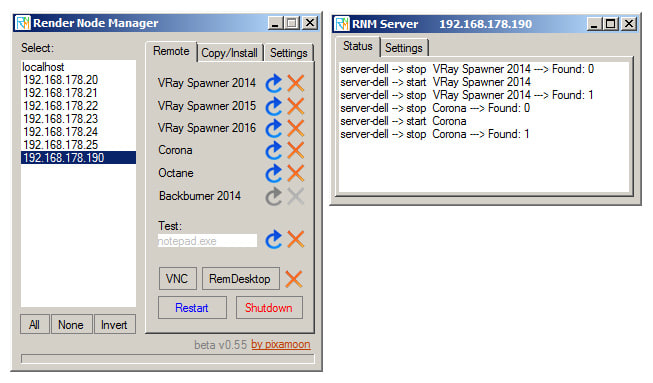
Render Nodes Manager allows user to remotely start / restart / stop VRaySpawner on all servers / nodes.
New version use small RNM Server (part of Render Node Manager) or Remote Desktop
RNM Server method: Render Node Manager connects to RNM Server only by local network. Very easy to setup - specify only network exchange path
Remote Desktop method: It works similar to PSTools but it start VRaySpawner as desktop application with access to all Network Mapped Drives
It is only beta version. Tested on Windows 7 Professional and Ultimate.
Please try and let me know what you think, about bugs etc.
Requirements: -Windows 7 Professional or Ultimate (doesn't work on Windows Home - this version of Windows does not support Remote Desktop) -DotNET Framework 3.5 or later -All nodes have to be ready to be connected by Remote Desktop with username and password (I'll add instruction or link how to do it soon)
v0.55: - send commands by RNM Server v0.50: - fully customizable 6 tasks (custom names and paths) - save settings: nods list, paths, etc v0.38 -works with Corona and Octane -new refresh buttons ____________________________________________ Note: This is demo version only. Demo version is limited to 3 nodes on the list only. Demo version does not save settings.
____________________________________________ Hope you like it! PIXAMOON