





Special Offer! Off

:::
Selected items only. See more offers in My Account.

extramodels

Royalty Free License - All Extended Uses
FORMATS
MaxScript 0.9
MaxScript 0.9
Specifications
2,009 Host Version
3ds max Host Application
Product ID 1126512
1 Products
Since 2016

Have questions? Chat with us now.

24/7 Live Chat
This script was created for ease of management, formation and use of vast libraries of models and textures, without which no modern visualization.
The basic principle of the script is based on the interpretation of each directory as an isolated 'collection of models', consisting of the original files in the format * .max, the actual file collection, in which only the proxy objects are present in Cproxy format and / or VRayProxy, and textures. The source files are only needed for the reorganization of the collection by the script, they will not change, except for renaming the specified version of the algorithm by the user. If you completed the formation of the collection, you can even remove, the operation of the collection will not be affected. However, it makes it impossible for you to make changes to the geometry of a model, if necessary, as well as the - on rebuilding the collection again
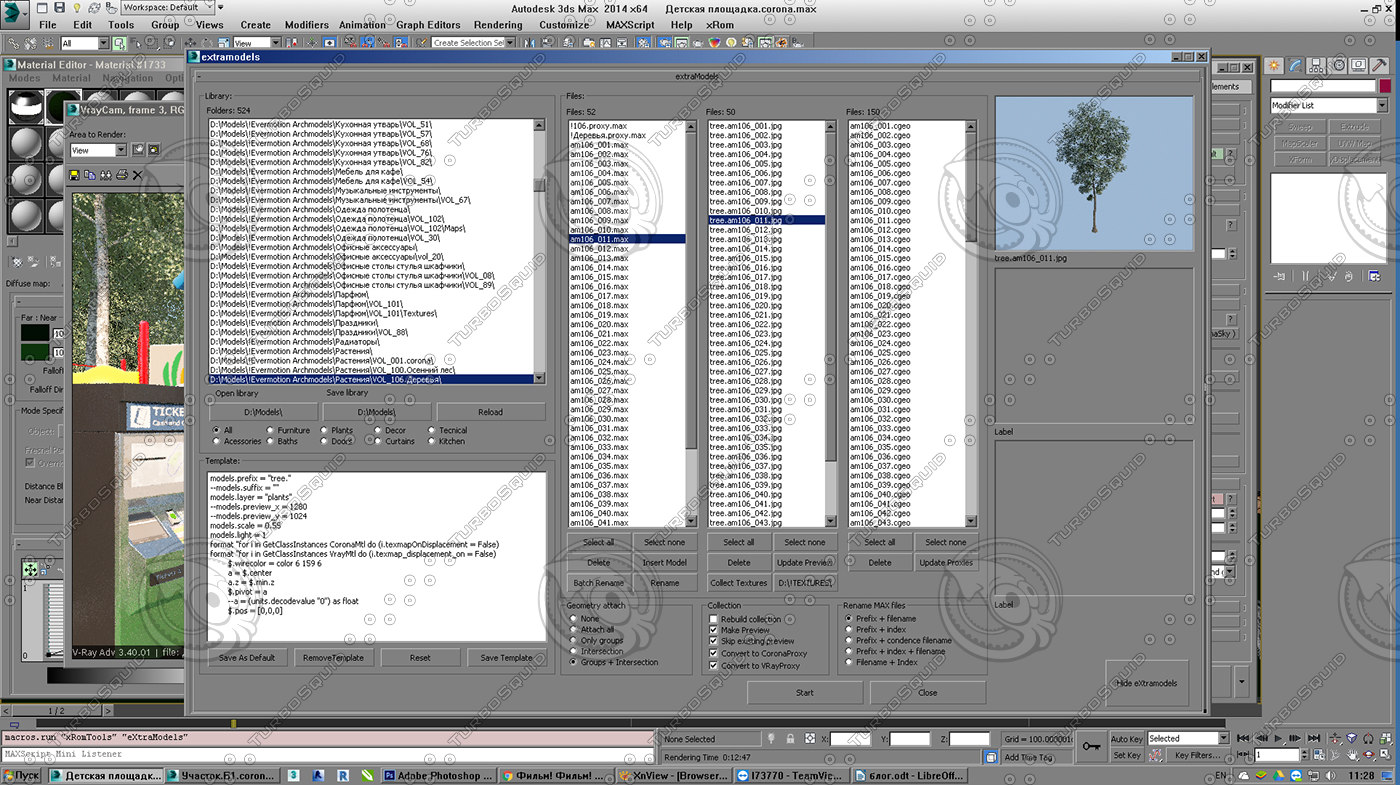
Thus, the main application panel consists of the following elements:
1) The main window
in it 'flat' form lists all directories with the models. Catalogues may be empty. Double-click on the catalog generation process starts with the collection of all the files in it.


2) Window template.


This is a text editor, where you can enter maxscript team to handle each model in each file. For example, you can assign all models in a single color grid, transfer them to the origin, change the prefix, to strengthen the power of light when generating previews, set the resolution of the preview is different from silent or load a preset to render. Actually this text is simply executed a script without any analysis, so there allowed any team maxscript language. At the time of its execution is required to have a dedicated model Editable_Poly, not translated in proxy format, so that it is permissible to use literals like '$' or 'selection'. However, you must enter commands very carefully as well as an error in a single letter will lead to crash the script or default on their given team.

3) the list of files.
They are divided into three columns: the first file in the *.max format, the second file in the *.jpg format, and the third - *.cgeo and *.vrmesh. It allows you to visually monitor the process of collection. Natural image collection itself is located in the first column (if it exists), but is not involved in the processing even if selected, i.e. recursive models accumulation does not occur in any case. Or rather it does not happen if you do not rename it manually, which is extremely undesirable, since the name of the collection is formed by the script, and when you change the script will cease to perceive this image as a collection.
3.1. file management panel models.
It consists of 6 buttons:


a) Select all button to select all files in the list
b) button Select none to deselect
c) the button Delete to remove the selected files and related file previews (but not a proxy!)
NOTE !: Please note: the collection file is deleted if it is selected!
Note: the script does not change the attributes of files so that files marked 'Read Only' will not be deleted.
g) button Insert model to add a file to a directory (not collections). The need for it is that in some collection occurs frequently adding new models, and new models are unstructured, chaotic accumulation of files and is usually the way to them to textures do not match the physical location of the files. When you call this command, there is a directory specified window models, the script copies the max
Related Products