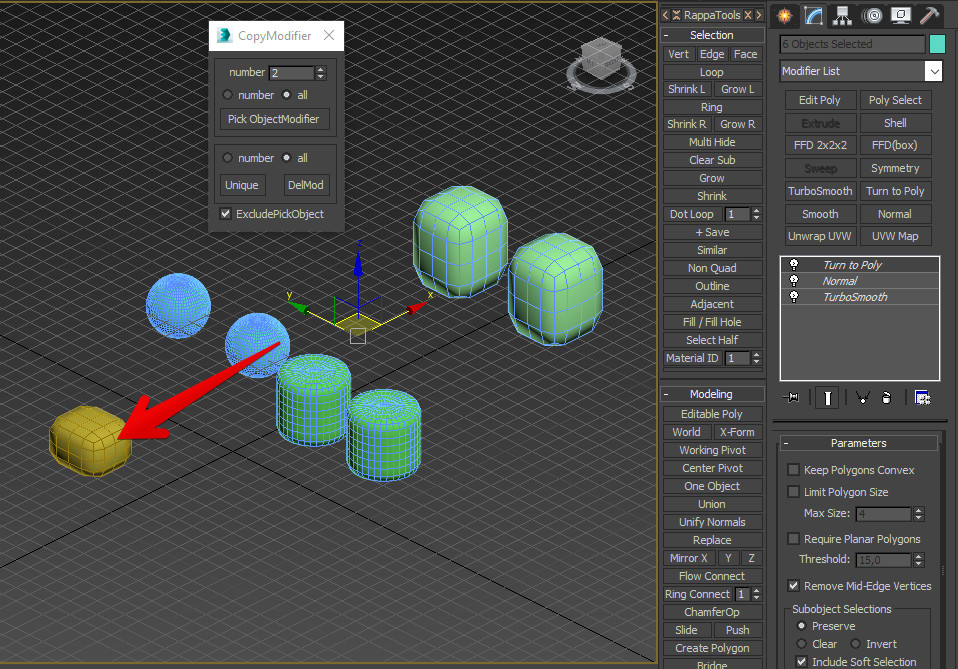
This script allows you to copy modifiers from a definite object to any count of selected objects. Instructions for use: 1) Select the objects to which you want to copy the modifiers; 2) Run the script and choose the number of modifiers that you want to copy (all or number) in the field to enter the account modifier number (by default 1 - upper), if number is selected; 3) Click on the Pick ObjectModifier button and select the object from which you want to copy the modifiers If necessary, you can make the modifiers of selected objects unique by clicking the Unique button or delete all modifiers - the DelMod button Tick ExcladePiskObject excludes self-copying of modifiers. If in selection set of objects are exist the instance objects, then copying is execute to one of group of instance objects. The script has custom settings for the radiobuttons, the checkbutton, the number, the position of dialog of script (script is create the file .ini)