


Special Offer! Off

:::
Selected items only. See more offers in My Account.

Customizable Brick Wall-Geometry Nodes-Blender model

3D Model License: Standard    Upgrade License
FORMATS
NATIVE
Blender 4.0.1  |  Cycles Render
Other Files
Customizable Brick Wall - Geometry Nodes.zip
3D Model Specifications
1,506 Polygons
2,000 Vertices
Unknown Geometry
Materials
Product ID: 2161934
151 Products
Since 2020

Have questions? Chat with us now.

24/7 Live Chat

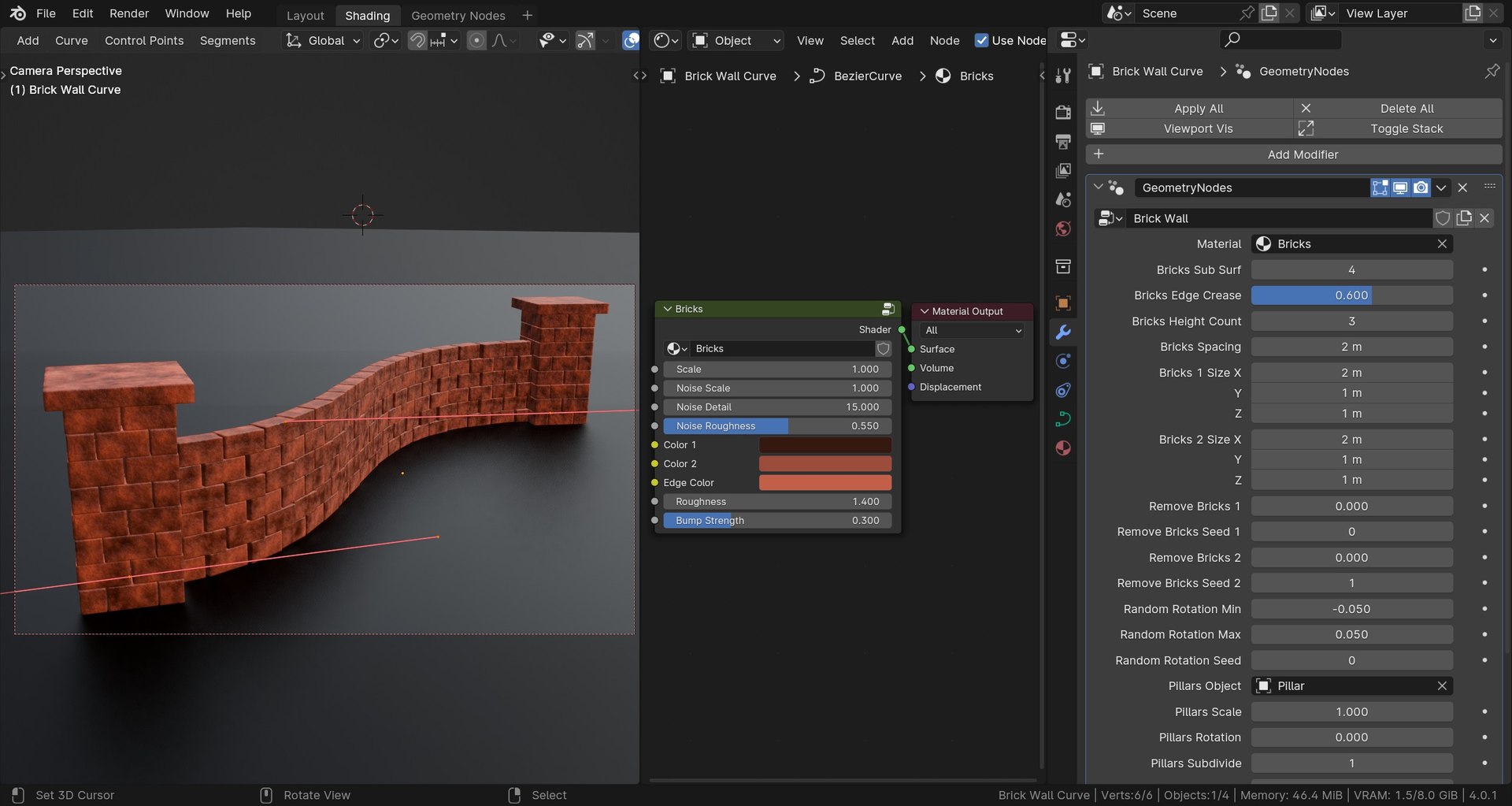
A Customizable Brick Wall, created with Geometry Nodes and Procedural Materials in Blender.

Geometry Nodes:
The geometry nodes modifier is applied to a curve object, which controls
the brick wall. Extrude, rotate, and scale the curve handles, to edit
the brick wall. The geometry nodes modifier setup also has many
customizable controls, like the brick size, sub-surf, edge crease, brick
wall height, random rotation, pillar object, material used, and many
more customizable values.

Pillar Objects:
The pillars objects at the start and end of the brick wall are 3d modeled
objects. They are distributed on the curve handles, and can be removed
with the geo-nodes customizable settings if you don't want them on the
brick wall. You can also choose between a short pillar, medium, tall, or
very tall pillar, depending on the size of your brick wall. You can
also choose weather you want the pillars to not be there at all, or just
at the start and end of the wall, or on every curve handle within the
curve.

The Brick Material:
The brick material included in the blender file is created procedurally with Blender's
procedural nodes. The procedural material also has custom values, like
the color, scale, roughness, bump, and more. If you want to use a
different material on the bricks, you can just add another material into
the material slot on the geometry nodes customizable settings.

Render Engine:
The product will work great in both Cycles and Eevee. However, the
pointiness value within the procedural material, which makes the edges
of the bricks look warn, will not work in Eevee.

Contents when Purchased:

  • Geo-Nodes Brick Wall Blender File
  • Procedural Brick Material (In Blender File)
  • Geo-Nodes Brick Wall (In Blender File)
  • Final Render
  • HDRI Lighting

Tutorial:
If you'd like to watch the full tutorial and learn how to create this
geo-nodes brick wall yourself, then you can watch the tutorial on my
YouTube channel, Ryan King Art.

Related Products
Animated
Abstract Particle Animation Loop - Geometry Nodes
Blender
blend
Collection
Rock Generator - Geometry Nodes
Blender
blend
Collection
Snow Generator - Geometry Nodes
Blender
blend
Collection
Blender Procedural Material Pack 18
Blender
blend
Collection
Blender Procedural Food Pack 2
Blender
blend
Collection
Blender Procedural Material Pack 1
Blender
blend
Collection
Blender Procedural Material Pack 22
Blender
blend
Collection
Realistic Grass and Clover
Blender + blend
blend blend
Collection
Seamless 3D Wall Bricks
3ds Max + c4d max c4d max c4d fbx obj
max c4d max c4d max c4d fbx obj
Collection
Seamless 3D Ceramic Tiles
3ds Max + c4d max c4d max fbx obj c4d
max c4d max c4d max fbx obj c4d
Collection
Bricks Brick Wall Sections and Broken
3ds Max + max c4d max c4d obj max c4d
max max c4d max c4d obj max c4d
Collection
Seamless 3D Ceramic Tiles 13
3ds Max + max max oth fbx obj
max max max oth fbx obj
Collection
Seamless 3D Glazed Bricks
3ds Max + c4d max c4d max fbx obj c4d oth
max c4d max c4d max fbx obj c4d oth
Collection
Castle Set
Blender + blend fbx obj blend
blend blend fbx obj blend
Collection
Street Elements Collection
Cinema 4D + obj fbx
c4d obj fbx
Collection
Seamless 3D Ceramic Tiles 7
3ds Max + max max fbx obj
max max max fbx obj
Collection
Seamless 3D Ceramic Tiles 8
3ds Max + max max max fbx obj
max max max max fbx obj
Collection
Modular Walls
3ds Max + c4d max max fbx
max c4d max max fbx
Rock wall 5
3ds Max + max fbx obj stl
max max fbx obj stl
Collection
Woodwork Collection
Cinema 4D + fbx max obj
c4d fbx max obj

by
Free
- Editorial Uses Only
